What AI is good for in a QBR, and what it isn't
Use AI to draft, not to diagnose. It's fast at turning notes into a scorecard, an agenda, an action plan and a pre-read email. It's unreliable at deciding what's causing a problem in an account, because the cause usually isn't in your notes. Draft with AI, then confirm the diagnosis with a person who knows the account.
| Hand it to the AI | Keep it yourself |
|---|---|
| Turning notes into slide text | Deciding which goals still matter |
| Building the scorecard from targets and results | Calling a status honestly when it's close |
| Listing causes that would explain a symptom | Finding out which cause is true |
| Drafting the pre-read and the recap | Choosing the decisions to ask for |
| Playing a skeptical sponsor in rehearsal | The conversation with your champion |
A free prompt to copy
This one drafts the three parts of a QBR that matter most: the scorecard, the diagnosis and the decisions. Paste your notes at the end.
I'm preparing a quarterly business review for a customer. Using only MY NOTES below, draft three things.
1. A scorecard: one row per customer goal with the measure, target, result, a status of On track, Watch or Off track, and the trend. Then a two-sentence read that names the off-track goal first.
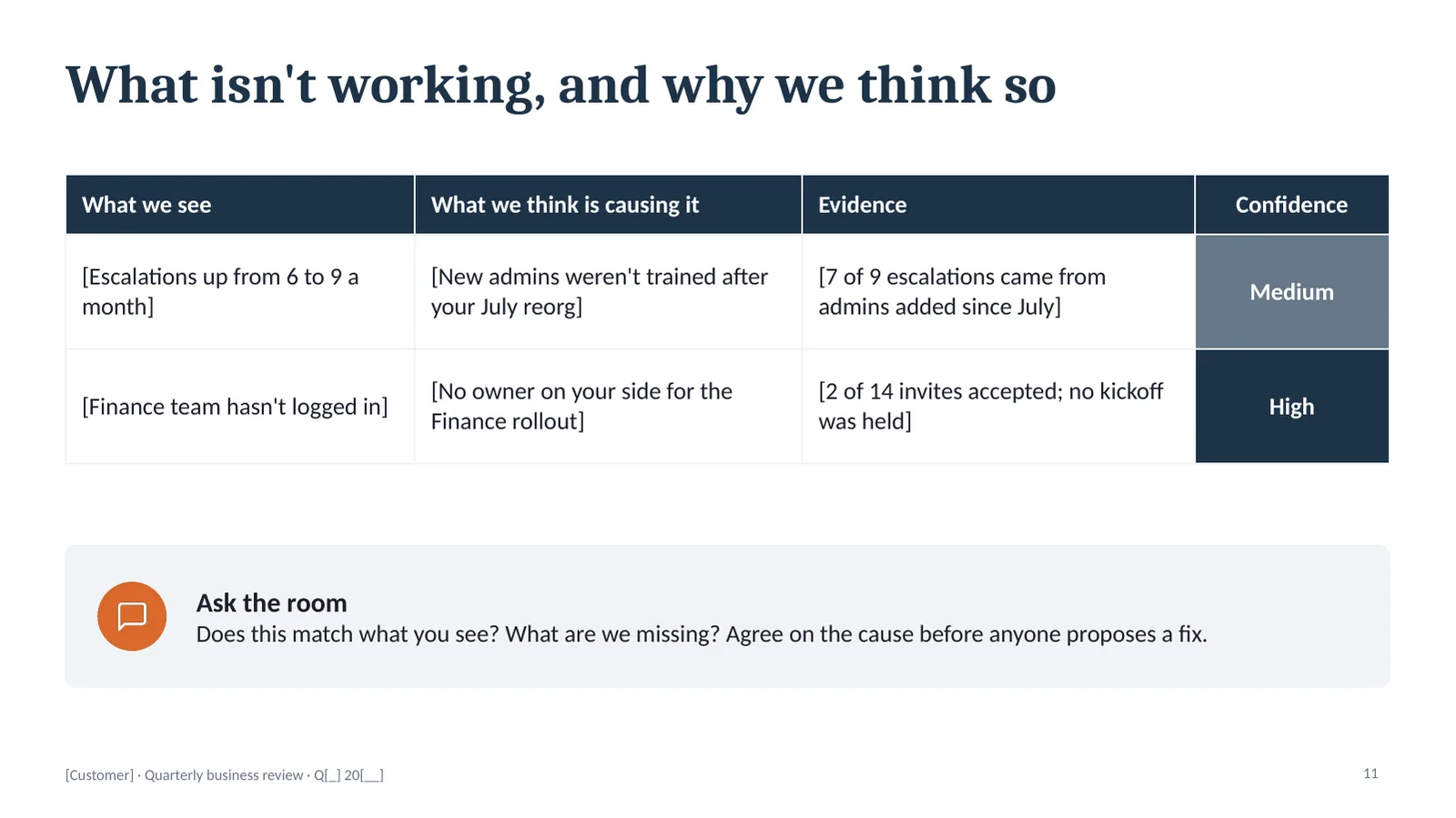
2. A diagnosis table for what isn't working, with four columns: what we see, what we think is causing it, the evidence from my notes, and a confidence rating of High, Medium or Low. If my notes don't support a cause, write "We don't know yet" with Low confidence. For each row, add two other causes I should rule out. Don't propose fixes.
3. Two or three decisions to ask for in the meeting, each with two options and a recommendation.
Rules: never invent a number, name, date or quote. Where something is missing, write [NEED: what's missing, and who could supply it]. Write the goals in the customer's words. Plain language.
Finish with five questions I should ask my champion before the meeting.
MY NOTES:
[Customer, quarter, who's attending]
[Their goals, with target, this quarter's result and last quarter's]
[What changed on their side this quarter]
[Usage by team, support trend, anything still open]
[The decisions I'd like from this meeting]
It works in Claude, ChatGPT, Gemini and Copilot. If you attach a template, such as the free starter deck, tell the assistant to match its slides.
Three rules that keep the draft honest
Make it mark what it doesn't know
Left alone, a model fills gaps with plausible numbers. That's the worst thing that can happen in a QBR. The NEED rule turns every gap into a visible to-do, with a name next to it. You'll often learn more from that list than from the draft.
Separate the symptom from the cause
Ask an AI why adoption fell and it'll give you a confident paragraph. Ask it for what you see, what might be causing it, the evidence and a confidence rating, and you get something you can check. The second format is the one to put in front of a customer.
Ask for the other explanations
The first cause a model offers is the most common one, which isn't the same as the right one. Asking for two alternatives per row, and what evidence would tell them apart, gives you the questions to take to your champion.
Then check it with a person
Here's where the time you saved should go. Call your champion, read them the diagnosis and ask, "Does this match what you see?" Ten minutes on that call does more for the meeting than another hour on the slides.
The AI gives you a fast draft of the read. Whether the read is right is still something only the people in the account can tell you.
Before you paste anything in
- Check your company's policy. Use an assistant that's approved for customer data.
- Leave out what the draft doesn't need. Contract values and personal details rarely change the slides.
- Verify every number against your own source before it goes on a slide.
The kit is built to be filled in by AI
Every placeholder in the QBR kit is in brackets, and every slide's notes say what belongs there, so an assistant can read the file and draft all 15 slides from your notes. Six prompts are included: draft the deck, stress-test the diagnosis, rehearse against the sponsor, the pre-read, the 30-minute cut and the recap. PowerPoint, opens in Google Slides, $39.
Checkout opens soon. Get the free starter deck now, and the scorecard if you want to hear when the kit is ready.
Questions about AI and QBRs
Can ChatGPT or Claude make a QBR deck?
Yes, as a first draft. Give it a template, your notes on the account and clear rules, and it will draft the content for each slide. It works best when the template tells it what belongs on each slide. You still need to check every number and confirm the diagnosis with the customer.
What should I give the AI?
The customer's goals with targets and results, what changed on their side this quarter, usage by team, the support trend, any value you can measure and how you measured it, and the decisions you want from the meeting. Rough notes are fine.
Will AI make up numbers in my QBR?
It can, unless you tell it not to. The prompt on this page instructs it to use only what's in your notes and to mark every gap as NEED. Check the draft against your own data before anything goes in front of a customer.
Is it safe to paste customer data into an AI tool?
That depends on the tool and your company's policy. Check which assistants your company has approved for customer data before you paste in names, numbers or contract details.
Does the deckhub QBR kit work with AI?
Yes. It's a standard PowerPoint file with every placeholder in brackets and instructions in each slide's notes, so Claude, ChatGPT, Gemini and Copilot can read it. The kit includes six prompts, and the main one drafts all 15 slides from your notes.
Can AI work out why an account is at risk?
It can suggest causes that fit the symptoms in your notes. It can't know which one is true. Treat its diagnosis as a list of things to check, and take it to your champion before the meeting.