What a QBR is for
A quarterly business review (QBR) is a meeting where you and a customer look back at the last quarter against the goals they set, agree on what isn't working and why, and decide what happens next. The customer's executive sponsor is in the room, which is the whole point: it's the one meeting a quarter where the people who can make decisions are listening.
That's also why so many QBRs are wasted. If the hour goes to a tour of your product's usage numbers, the sponsor learns nothing they couldn't have read in an email, and leaves without deciding anything.
Why most QBRs go wrong
- They report instead of diagnose. Usage charts and ticket counts tell the customer what happened. They don't say why, or what to do about it.
- They start from your product, not the customer's goals. If the first content slide is your feature list, the meeting is about you.
- Nobody names the decisions. If you don't say up front what you need decided, you won't get it decided.
- The real problem shows up late. A risk that is first raised on the renewal call was a QBR that didn't do its job.
Before the meeting: two weeks of prep
Most of a good QBR happens before anyone joins the call. Work back from the meeting date:
- 14 days out: pull the data. Gather the customer's goals, usage, support history and any value you can measure. Invite the executive sponsor, not just your day-to-day contact.
- 10 days out: call your champion. Ask what's working, what isn't, and what their boss cares about this quarter. This is where you find the surprises, so they don't find you in the room.
- 7 days out: send a pre-read. Share the scorecard and the decisions you'll ask for. Nobody should be seeing the numbers for the first time in the meeting.
- 2 days out: confirm the room. If the person who can make the decisions can't attend, move the meeting rather than hold it without them.
- 1 day after: send the recap. Decisions, owners and dates, within 24 hours.
A 60-minute QBR agenda
An hour is enough if you protect the middle. The diagnosis gets the most time because it's the part only this meeting can do. If you run short, cut the roadmap, never the diagnosis or the decisions. There's a 30-minute version on the QBR agenda page.
| Minutes | Block | Who talks most | Done when |
|---|---|---|---|
| 0–5 | Open and name the decisions | You | They know what they'll be asked to decide |
| 5–15 | Their goals and the scorecard | The customer | They've confirmed or corrected the goals |
| 15–30 | What's working, what isn't, and why | The customer | You agree on the cause, not just the symptom |
| 30–40 | Next quarter and the roadmap | Both | Next quarter's goals are written down |
| 40–55 | Action plan and decisions | Both | Every action has an owner and a date |
| 55–60 | Recap | You | You've read back each decision and owner |
What goes on each QBR slide
Fourteen slides is plenty for an hour. Put everything else in an appendix you can point to when a question would pull the meeting off course. For the detail on each one, see the QBR deck, slide by slide.
- Cover. The customer's name first, and the executive sponsor's name on the "prepared for" line.
- Today. The agenda, and the two or three decisions you need by the end of the hour.
- Their goals. What they told you they're trying to achieve, in their words, with how each is measured and who owns it on their side. Ask whether these are still right before you go on.
- Scorecard. One row per goal: target, result, trend, and an honest status of on track, watch or off track. Say the red row out loud.
- Value delivered. Three outcomes in the customer's language: time, money or risk. Show how you calculated each one, or it gets discounted.
- Adoption. The one cut of usage that explains the scorecard, usually by team or role. Ask about the bottom of the chart, not the top.
- What's working. Two or three things, each with one piece of evidence and, ideally, a quote from your champion.
- What isn't working, and why. The diagnosis. More on this below.
- Support and account health. The support trend, plus the signals that predict renewal: sponsor engagement, renewal date, survey score.
- Risks and open issues. Risks to their goals or to the relationship, each with an owner on one side or the other.
- Next quarter. No more than three goals, each with one measure and one target. These become next quarter's scorecard.
- Roadmap. Only what touches their goals, with a line on why each item matters to them. Say plainly what's dated and what isn't.
- Mutual action plan. Every action, a named owner, which side owns it, a date, and what "done" means. Fill it in live.
- Decisions. The decisions from the agenda slide, each with the options and your recommendation.
The slide most QBR templates skip
Most templates jump from the scorecard to the roadmap. That skips the only conversation that changes anything: what isn't working, and why.
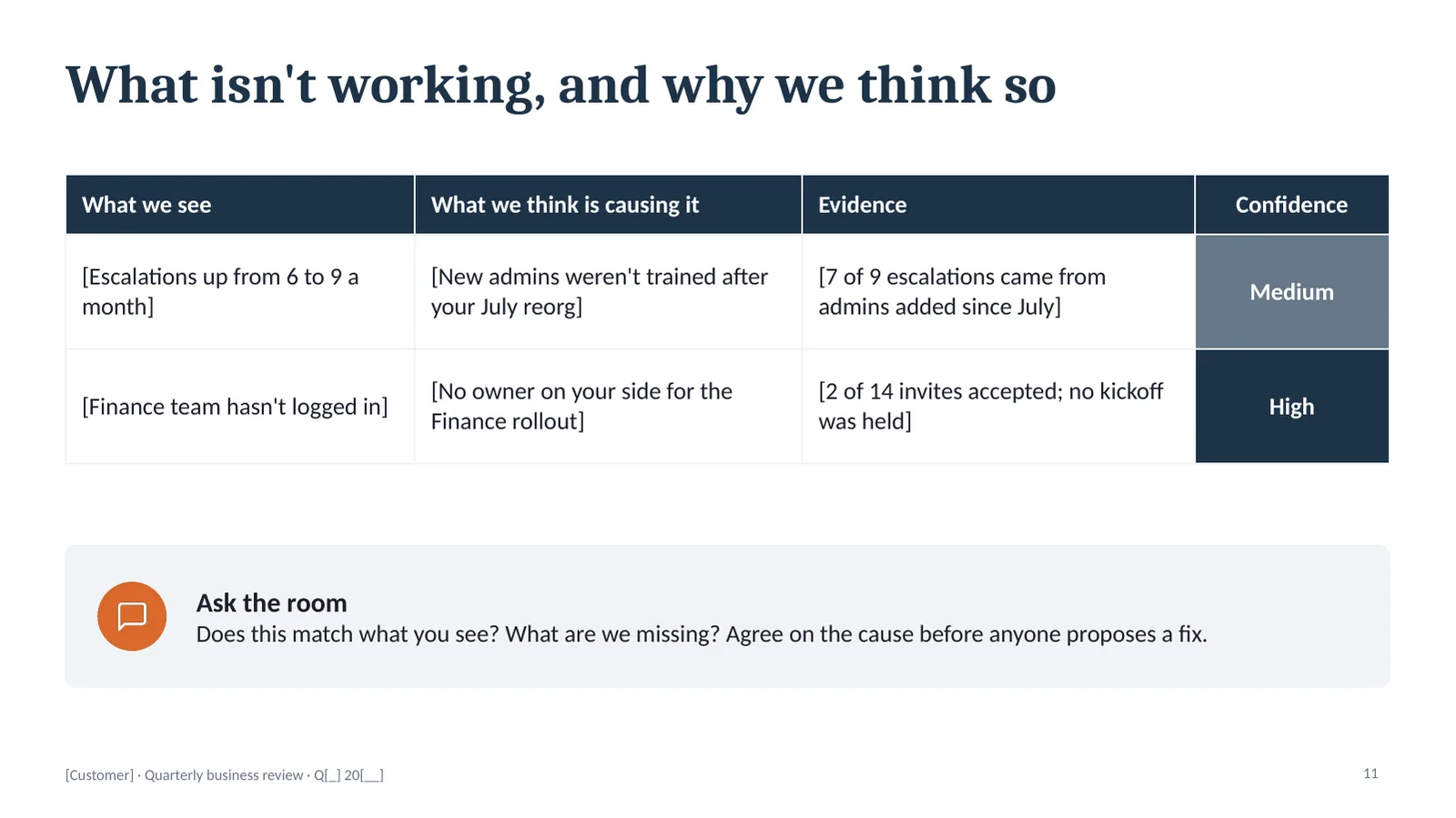
Lay it out in four columns. What we see is the symptom: escalations went up. What we think is causing it is your diagnosis: new admins weren't trained after a reorg. Evidence is why you believe it. Confidence is how sure you are.
Then ask, "Does this match what you see?" and stop talking. The customer's correction is the most useful thing you'll hear all hour. Rating your confidence honestly helps: "medium" invites them to fill in what you're missing, and agreeing on the cause before anyone proposes a fix is what keeps the action plan from treating symptoms. The completed QBR examples show this slide filled in for three different accounts.
After the meeting
Send the recap within 24 hours: the decisions, the action plan with owners and dates, and next quarter's goals. There are follow-up email templates you can copy. Then open next quarter's QBR from that same list. When the scorecard you show in three months is the one the customer agreed to today, the meeting stops being a report and becomes a working rhythm.
Get the QBR template
The deckhub QBR kit has every slide above, in this order, with notes on each one: what goes there, what to ask and what to avoid. It also includes the prep timeline and the run-of-show. PowerPoint, opens in Google Slides, $39.
Checkout opens soon. Get the free starter deck now, and the scorecard if you want to hear when the kit is ready.
QBR questions
How long should a QBR be?
Sixty minutes for most accounts. If you only have 45, shorten the roadmap and the value slide, not the diagnosis or the decisions.
Who should attend?
On the customer's side, the executive sponsor and your day-to-day champion. On yours, the account owner and someone senior enough to commit to the action plan. If the person who can make the decisions can't come, reschedule.
How many slides should a QBR have?
About fourteen, plus an appendix. More than that and you'll spend the hour presenting instead of deciding.
What's the difference between a QBR and a status update?
A status update reports what happened. A QBR decides what happens next. If nothing on the agenda needs a decision, send the update as an email and save everyone the hour.